Device Lock/Unlock
The Espresso driver allows interactions with the Android lock screen using various APIs.
Available APIs
The driver provides several capabilities for unlocking the device screen on session startup:
appium:skipUnlockappium:unlockTypeappium:unlockKeyappium:unlockStrategyappium:unlockSuccessTimeout
Additionally, the driver includes execute methods for locking or unlocking the device during the session:
Unlock Types
The above capabilities and execute methods support multiple unlock types, which change the expected format of the unlock key.
pin
Can be used for PIN code-based lockscreens. The unlock key should match the PIN code and consist of
its digits, for example 1111.
Under the hood, the driver simply searches for button elements matching each digit in the PIN code, and taps on them.
pinWithKeyEvent
Can be used for PIN code-based lockscreens. Equivalent to the pin type, but implemented
by sending key events via adb instead.
password
Can be used for password-based lockscreens. The unlock key should match the password and consist of
latin characters, for example abcd1234.
pattern
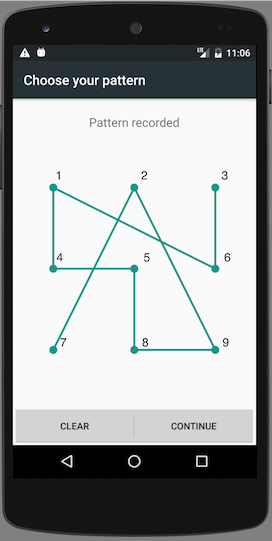
Can be used for pattern-based lockscreens. The unlock key should be a sequence of digits, where each digit matches a pattern point, when ordered left-to-right, top-to-down.
For example, the unlock key in the following image is 729854163.
fingerprint
Can be used for fingerprint-based lockscreens. Only supported on emulators. The unlock key should
be the identifier of the virtual fingerprint, similarly to the mobile: fingerprint
execute method.